If you are looking for the best IPTV applications for Android, this article is for you.
Stay with us to explore more useful information and find the option that best suits your needs.
Table of Contents
What Is an IPTV App?
An IPTV app is a user-friendly video player for live TV, VOD content, and live streaming on Android devices, Android TV, tablets, iPad, Apple TV, Fire TV, and TV boxes. It supports M3U playlists, Xtream Codes API, EPG (electronic program guide), catch-up, subtitles, DVR, Chromecast, and multi-screen viewing. A compatible IPTV platform offers smooth navigation, seamless playback, high-quality streaming, customization options, and lag-free access to content.
Advantages and Disadvantages of IPTV Apps :
Advantages :
- Easy access to live TV, films, and series
- Flexible viewing across multiple devices
- Simple setup using playlists
- Wide range of content depending on provider
- User-friendly interface with customisation options
Disadvantages :
- No built-in content in most apps
- Requires a reliable IPTV provider
- Possible buffering depending on internet and servers
- Legal risks with some services
- Quality and performance may vary
Best IPTV Apps for Android
IPTV Smarters Pro :
IPTV Smarters Pro stands at the forefront of digital streaming technology, combining high performance with effortless usability in an all-in-one experience like no other. Widely regarded as one of the most trusted streaming applications on the market, it supports M3U playlists, Xtream Codes, live TV, and on-demand content, all wrapped in a sleek, user-friendly interface. Whether you are a first-time user or a seasoned streamer, this application delivers a smooth and reliable experience that genuinely raises the bar.
Pros :
- Supports M3U files and Xtream Codes API
- Multi-screen viewing available simultaneously
- Channels organised by country and category
- Catch-up and VOD content fully supported
- Clean and intuitive interface
Cons :
- Requires an active subscription from a provider
- Occasional crashes reported on some devices
- Setup can be confusing for absolute beginners
- No built-in content or channels included

IPTV Smarters Pro
How does it work?
To find out how to use IPTV Smarters Pro on your Android device, you first need to download the application. You will find the app on Uptodown because it is not available on Google Play or the Play Store.
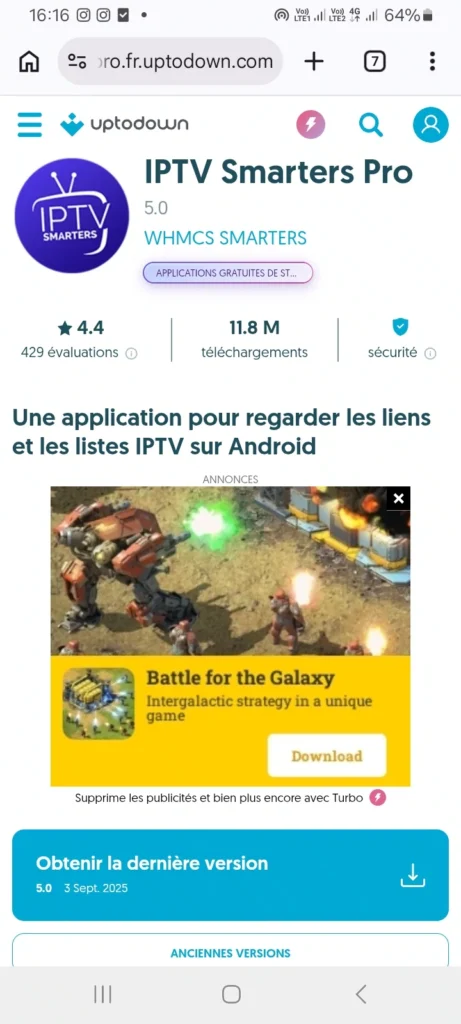
After downloading and opening it, the app displays the available formats for adding a playlist on the main screen. You then choose the format that suits you best.
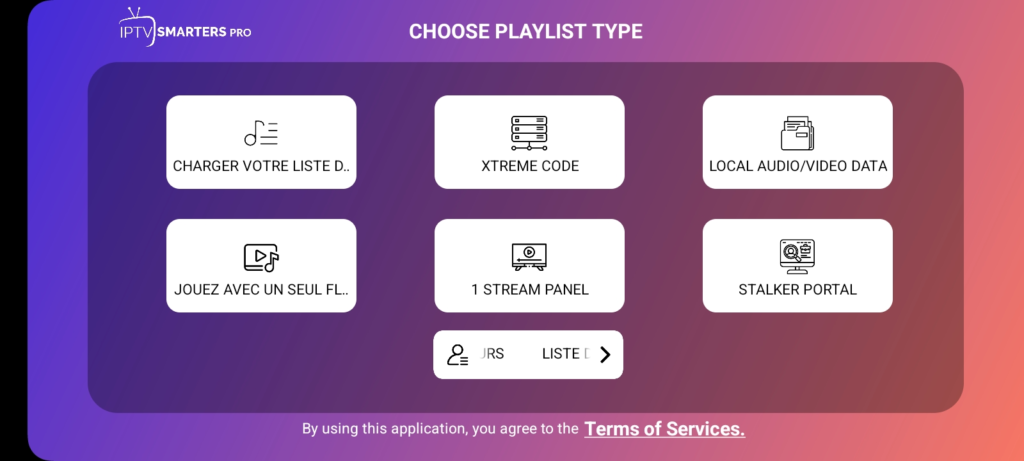
In this case, we will select the Xtream Code format. After choosing Xtream Code, you need to enter the required details: username, password, and server URL.
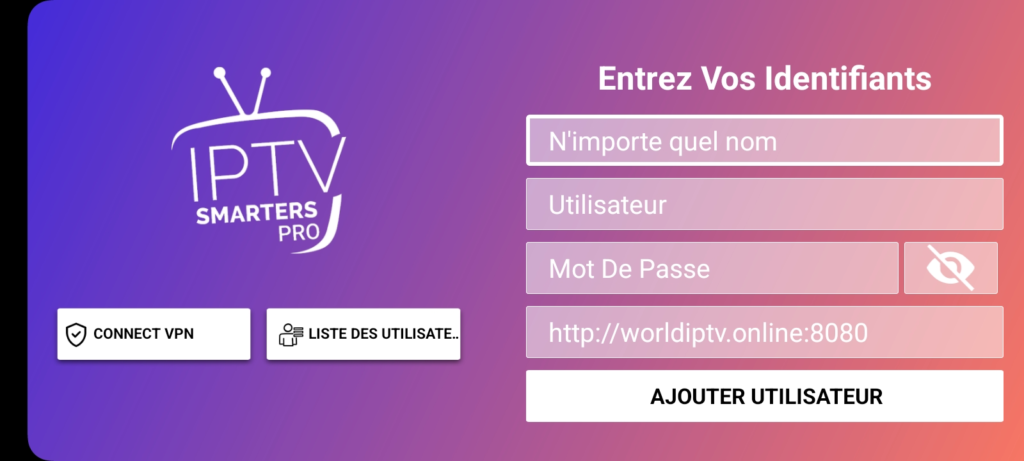
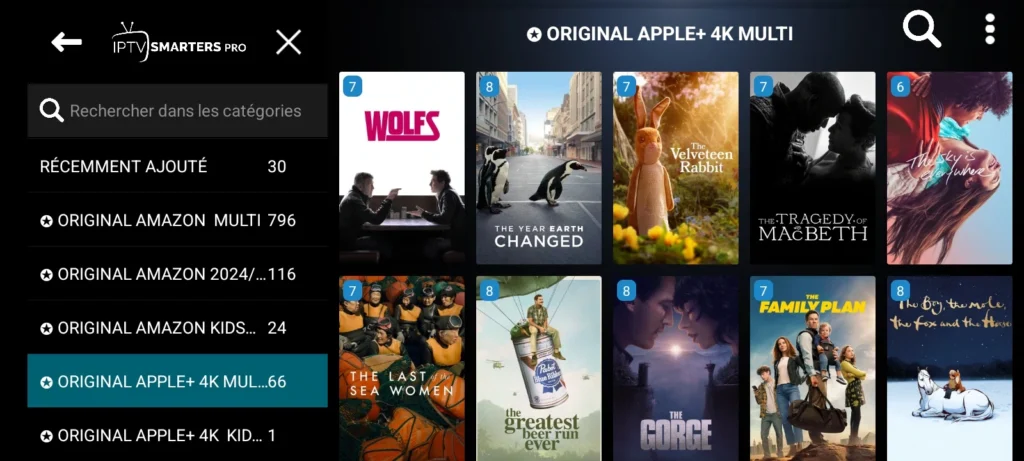
After that, we will load the playlist and wait a few minutes for the content to finish loading. Once it is ready, you can start watching straight away.
GSE Smart IPTV :
GSE Smart IPTV stands out for its exceptional ability to deliver stable and seamless streaming, making it the ideal choice for anyone who refuses to compromise on quality or professionalism. Built with versatility at its core, it supports a broad range of playlist formats and goes beyond basic playback by offering Chromecast compatibility, a built-in web browser, and advanced EPG management.
Pros :
- Supports multiple playlist formats including M3U and JSON
- Built-in web browser for easy playlist management
- Chromecast and AirPlay compatible
- Parental controls available
- Stable and smooth playback performance
Cons :
- Interface feels somewhat outdated compared to competitors
- Some advanced features locked behind a paid version
- EPG configuration can be tricky for new users

GSE Smart IPTV
How does it work?
To try the GSE Smart IPTV application on Android devices, you first need to download the app from the Play Store.
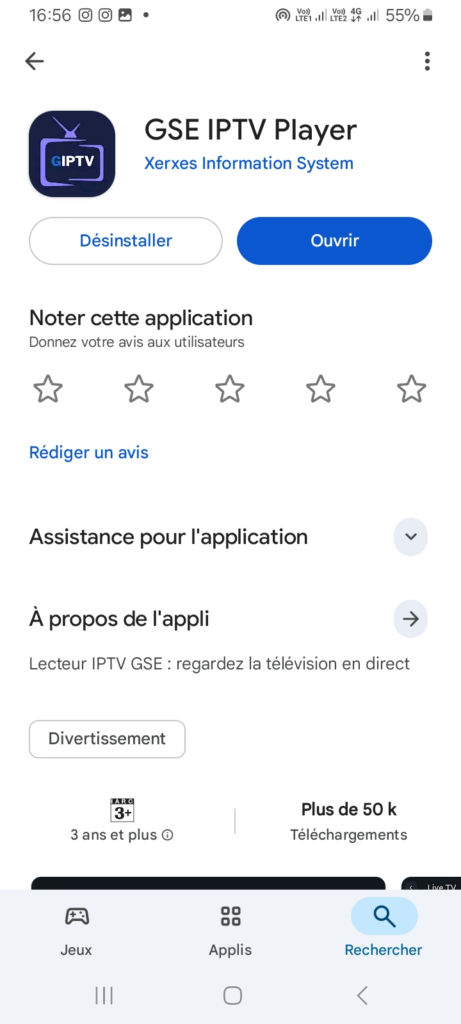
After downloading and opening it, the main screen will display the MAC address you need to register on the application’s official website.
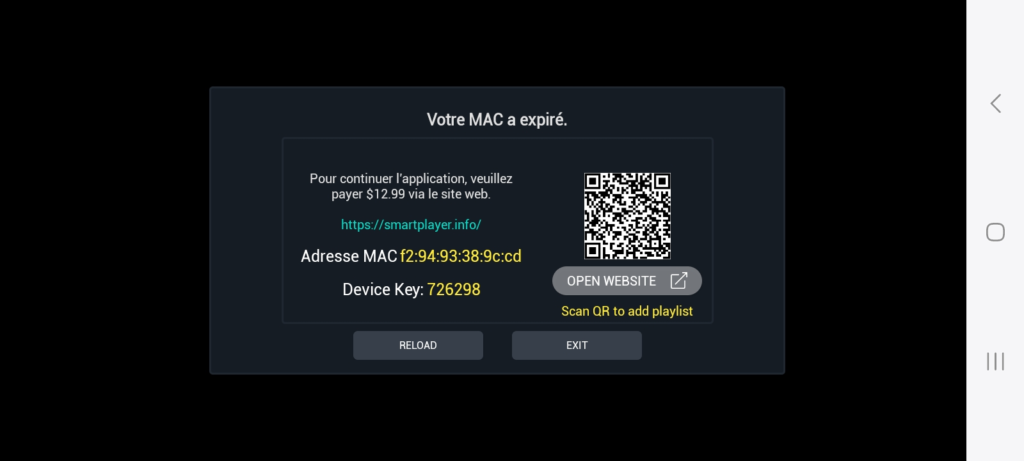
After that, you need to visit the website and sign in with the required details.
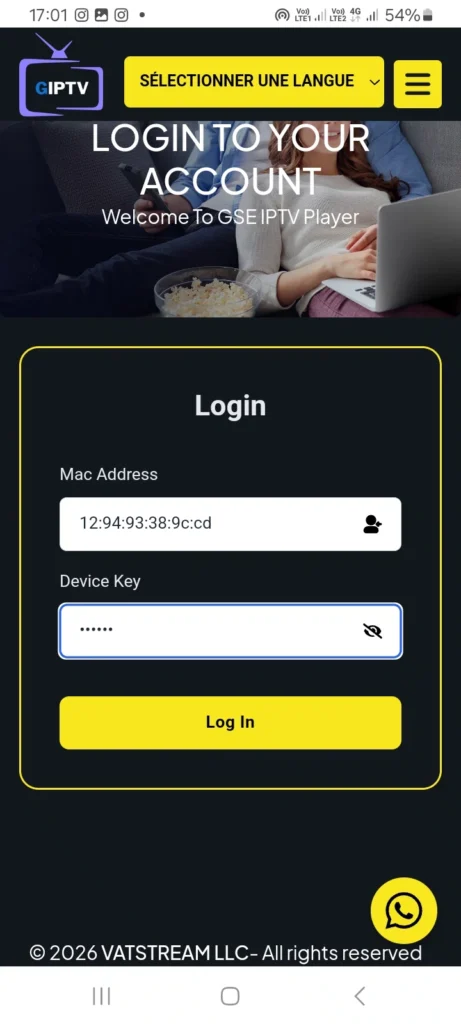
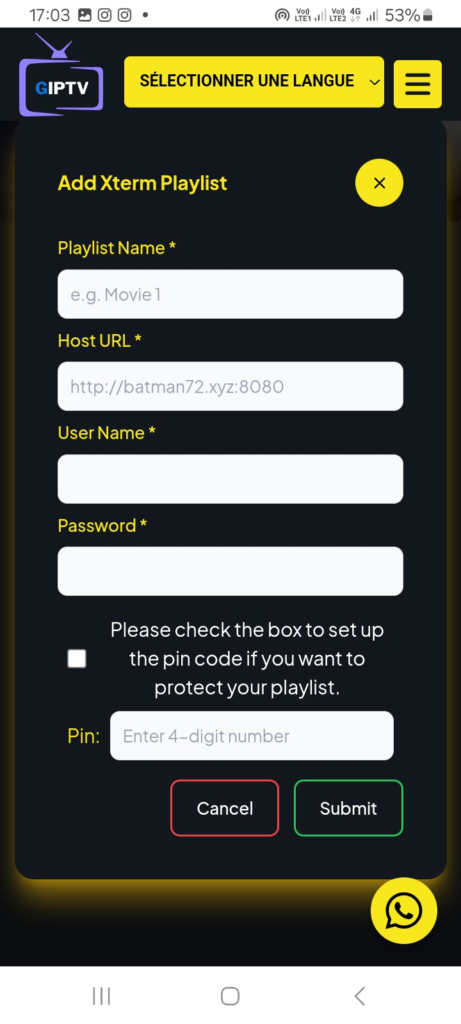
Once you have logged in, you can add a playlist by choosing the format you want to use. In our case, we will choose the Xtream Code format. You then need to fill in the required information provided by your provider, including the username, password, and server URL, and add the playlist.
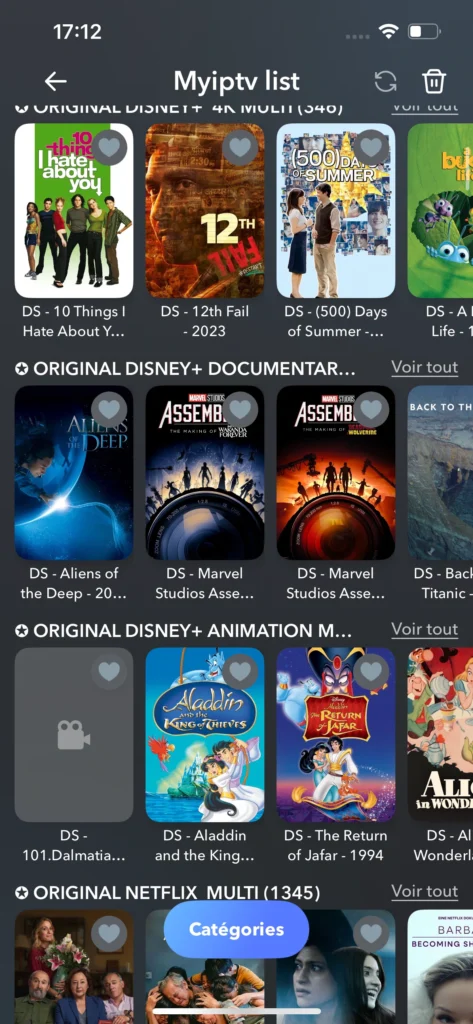
After that, return to the application, and you will find that your playlist has been added; then you can start watching your content with ease.
Televizo :
Televizo is one of the most sought-after streaming tools in the digital market today, thanks to its wide range of features that effortlessly cater to both beginners and experienced users alike. What truly sets it apart is its ability to handle unlimited playlists simultaneously, combined with a comprehensive parental control system and a refreshingly simple interface that never feels overwhelming. For families and individuals who want a straightforward yet capable streaming solution, Televizo is hard to beat.
Pros :
- Unlimited playlists can be added simultaneously
- Full parental control system included
- Simple and beginner-friendly interface
- Supports multiple streaming services
- Lightweight and fast to load
Cons :
- No multi-screen or picture-in-picture mode
- Limited EPG customisation options
- No built-in recording or time-shift feature
- Some features reserved for the premium version only

Televizo
How does it work?
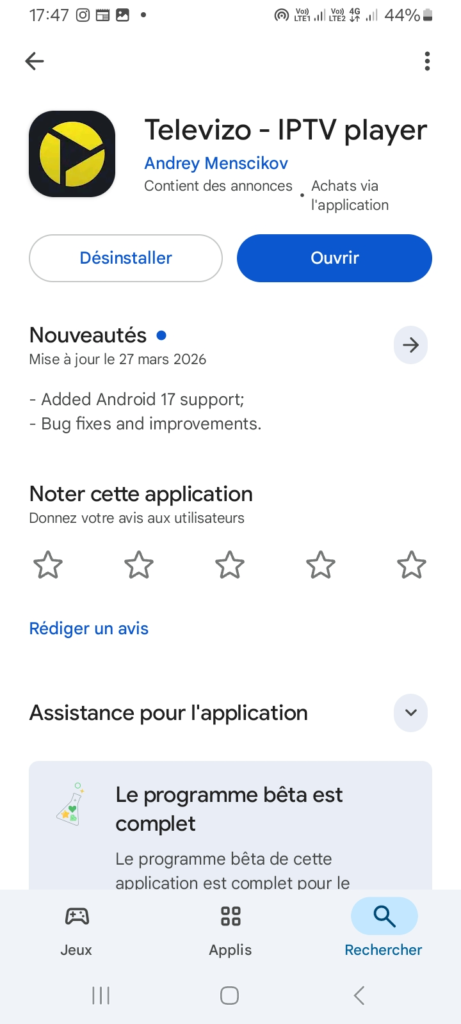
We will follow the same process for the Televizo application, as the steps are generally similar across most IPTV apps. First, download the app from the Play Store.
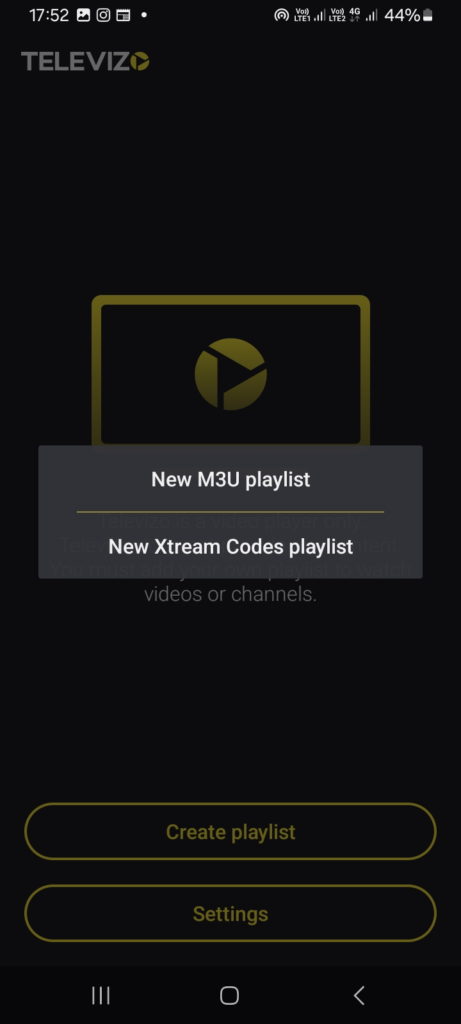
After opening it, the app will immediately display playlist options in two formats: M3U and Xtream Code. You can choose the format that suits you, but Xtream Code is usually the best option as it works more smoothly and quickly.
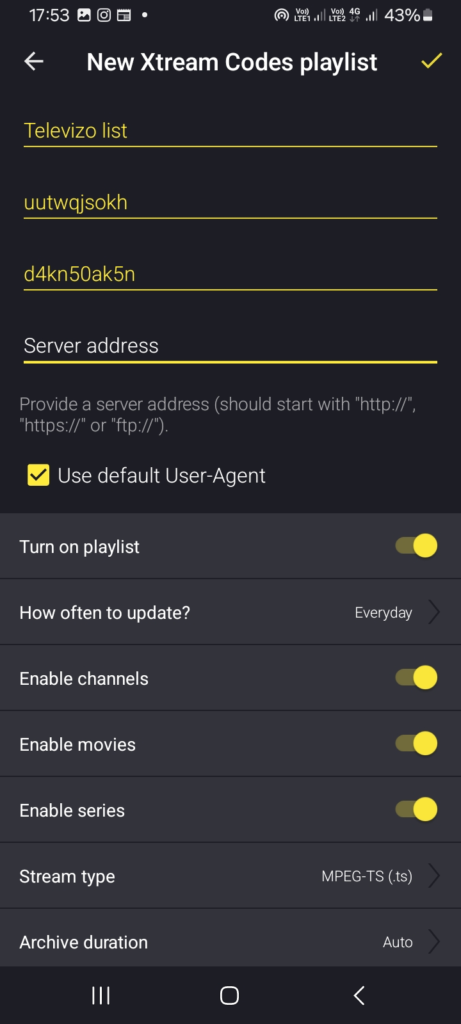
Next, enter the required details provided by your provider, including the username, password, and server URL.
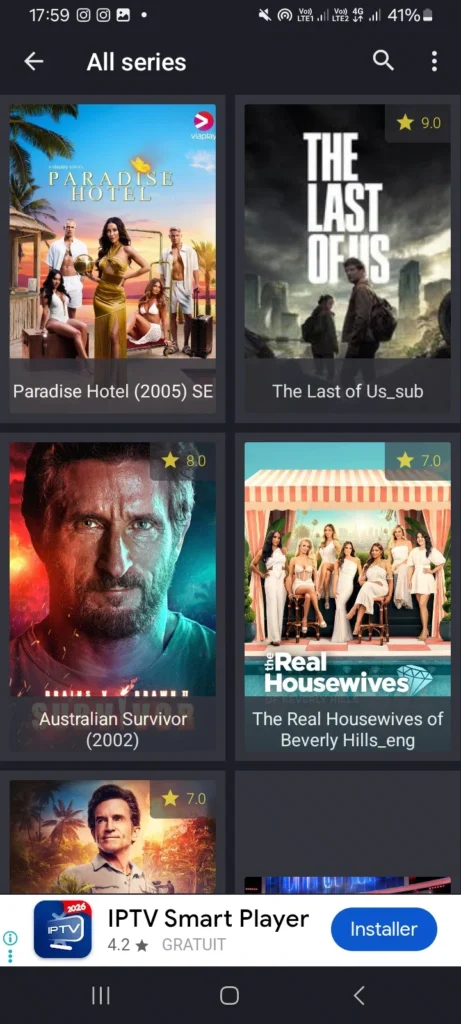
Once the information is filled in, add the playlist and wait a few moments for the content to load. After that, you can enjoy watching your favourite programmes, films, and series with ease.
Xciptv Player :
XCIPTV, thanks to its advanced technical architecture and carefully crafted interface, grants users a premium viewing experience that rivals the highest international standards in the field. Equipped with dual media players, ExoPlayer and VLC, alongside adaptive HLS streaming, DVR recording, and seamless multi-device synchronisation, it stands as one of the most feature-rich streaming applications available on Android.
Pros :
- Dual player support: ExoPlayer and VLC
- DVR recording on internal and external storage
- Multi-device synchronisation across platforms
- Adaptive HLS streaming for uninterrupted playback
- Scheduled recording and programme reminders
Cons :
- Does not provide any built-in content or channels
- Interface may feel overwhelming for beginners
- Some features require a paid subscription

Xciptv Player
OTT Player :
OTT Player offers a complete suite of digital streaming services that puts the user firmly in the driving seat, granting full control over every detail of their daily viewing experience. Designed with simplicity and efficiency in mind, it brings all your playlists together into one clean, ad-free interface, while its cross-device cloud syncing ensures your content is always at your fingertips, no matter which device you pick up. For those who value a no-fuss streaming experience without unnecessary clutter, OTT Player is a genuinely solid choice.
Pros :
- Clean, completely ad-free interface
- Smooth and highly responsive playback
- Straightforward playlist management
- Reliable cross-device cloud syncing
- Lightweight with minimal resource usage
Cons :
- No subtitle support whatsoever
- Lacks proper EPG integration
- No recording or time-shift functionality
- No built-in content or channel suggestions included
OTT Player
Tivimate :
TiviMate is an IPTV player designed for watching and managing live content via a URL provided by your service. It supports m3u or xtream formats, offers intuitive navigation, adaptive streaming, and 4k playback, delivering a smooth viewing experience across devices in 2026. It also includes many features, letting users watch movies and channels based on personal preference, with vpn use depending on need.
Pros :
- supports m3u or xtream
- offering a smooth overall viewing
- strong performance across devices
- easy access to live content
- suitable for watching live channels
- can watch movies and on-demand content
- flexible setup based on personal preference
Cons :
- no built-in content
- premium features are paid
- needs a valid Url

Tivimate
Zen IPTV player :
Zen IPTV Player has earned the trust of millions of users around the world thanks to its notable stability and ability to deliver a streaming experience free of unnecessary complexity. It features a clean, polished interface with support for live channels, catch-up, films, series, EPG, 4K, HDR, and Dolby Vision.
Pros :
- Clean and polished interface
- Supports 4K, HDR, and Dolby Vision
- Live TV, catch-up, films and series available
- Picture in Picture feature
- Multi-device sync with one account
- Favourites and resume watching options
- EPG (TV guide) integration
- Stable and smooth streaming experience
Cons :
- No built-in content provided
- Requires external sources or subscription
- Some advanced features may need activation
- Depends on content provider quality

Zen IPTV player
VLC Media player :
VLC for Android combines intelligent design with precise performance to deliver a complete solution that removes the need for extra tools and saves users time and effort. This free, open-source multimedia player supports most video and audio formats, network streams, subtitles, multiple audio tracks, and Android TV use. With no adverts, no in-app purchases, and broad file compatibility, it remains a practical and reliable choice for everyday playback.
Pros :
- Free and open-source
- No adverts or in-app purchases
- Supports most video and audio formats
- Works with network streams and shared folders
- Supports subtitles and multiple audio tracks
- Compatible with Android TV
- Simple and reliable for everyday use
- No extra codec download needed
Cons :
- Interface is less modern than some players
- Not designed specifically for IPTV use
- Advanced IPTV organisation features are limited

VLC Media player
Kodi :
Kodi has been designed to meet high user experience standards, turning the initial setup from a complex task into a few simple steps that take only minutes. This powerful open-source media platform lets users organise and play films, series, music, photos, podcasts, and TV channels in one place. With broad format support, add-ons, smart libraries, and compatibility across multiple devices, it offers a highly flexible and complete entertainment experience.
Pros :
- Open-source and completely free
- Supports a wide range of formats (video and audio)
- Add-ons allow extended features and customization
- Centralises all content in one interface
- Smart library with metadata and automatic organisation
- Supports 4K and 8K playback
- Compatible with many devices (TV, PC, console, Android)
- Highly flexible and customisable
Cons :
- Setup can be complex for beginners
- Requires add-ons for full functionality
- Interface may feel heavy on low devices
- Depends on configuration for best performance

Kodi
IBO Player pro :
IBO Player Pro positions itself as a professional digital tool by supporting high-quality content playback and offering broad compatibility across devices and platforms. Designed as a premium media player, it allows users to load playlists, watch live TV, browse films and series, organise VOD libraries, and use EPG guides in a single, clean interface. Its smooth navigation, fast channel switching, and multi-device support make it a practical choice for modern streaming.
Pros :
- Clean and professional interface
- Supports playlists via M3U and URL
- Live TV, films, series, and VOD support
- EPG guide compatibility
- Fast channel switching
- Multiple playlist support
- Resume and continue watching feature
- Works across Smart TVs, Android TV, Fire devices, phones, and tablets
- Smooth multi-device experience
Cons :
- No built-in content included
- Requires user-provided playlists
- Premium player, so full use may require payment
- Depends on provider quality for overall performance

IBO Player pro
Conclusion :
In this article, our team has tried to present some of the best IPTV apps for Android devices that work well and provide a high-quality service. We hope this article has been helpful and that you were able to find the app that best suits your preferences. Do not forget to share your opinions with us in the comments.
FAQ :
How does an IPTV app work on Android?
An iptv app for Android TV works by connecting to an iptv provider and loading data through login or playlist details. The app offers access via a simple user interface, allowing users to stream live tv smoothly. It can integrate with external players to optimize playback quality and reduce buffering during playback.
Do IPTV apps include channels or content?
IPTV apps do not include channels or content by default, as they depend on an iptv service provided externally. The app offers a platform to access hd streams through playlists. It remains customizable, letting users organise content through the menu and manage how channels are displayed based on their preferences.
Which format is better: M3U or Xtream Codes?
The choice depends on user needs, but many apps support Xtream Codes for easier setup and better organization. This format helps integrate account details directly, making navigation simpler. M3U remains flexible, but Xtream Codes is often preferred for optimizing performance and ensuring a more stable, structured streaming experience.